Packages Limits (Certified vs Uncertified)

This article mainly focuses on an important aspect of the certified managed package, the Limit property. What this property means and why it is important.


What are Packages?

Packages in Salesforce are tools for distributing components between environments. The package can contain a very wide variety of components, such as objects, fields, automation processes, code, and more. Packages do not contain data.


Packages can be divided into two types: Managed and Unmanaged. While Unmanaged is like open source, where the components can be modified after installation, Managed is the opposite, and most of the components are locked and managed by the package provider.


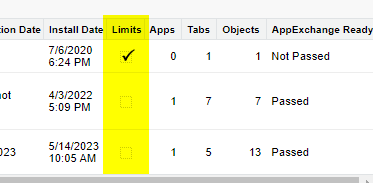
The Managed packages can also be divided into two subtypes: certified and uncertified. A certified package is a package that has passed the Salesforce security review process to verify that it meets specific standards and security levels, which allows the provider to publish it on the AppExchange.

There are a few differences between certified and uncertified, and a very important one is the Limit property. The property means that the package has its own limits. But, what does it really mean when it says "has its own limit"?

Unsupported Object Types for SOSL Query


Although SOSL (Salesforce Object Search Language) is less commonly used than SOQL (Salesforce Object Query Language), it does provide some powerful features.

Main SOSL advantages are the ability to search multiple objects in a single query and the ability to search for a keyword in all the text fields in the queried objects (this includes long text fields!).

You can read more about the basics and considerations for SOSL queries in Salesforce guide. In this article, I will focus on a specific consideration - supported and unsupported object types for SOSL.


Consider the following apex code that provides a function for searching any object type:

public with sharing class QueryServices{
    public static List<sObject> searchRecords(String objectType, List<String> fields, String searchKeyword){
        List<SObject> records = new List<SObject>();    
 
	searchKeyword += '*';
        String returningQuery = objectType + ' (' + String.join(fields,',') + ')';
        String query = 'FIND :searchKeyword IN ALL FIELDS RETURNING '+returningQuery+' LIMIT 20';
        
        records = Search.Query(Query)[0];
        
        return records;
    }
}


The method searchRecords receive as parameters:

  • Object name to search
  • List of fields to query
  • Keyword
The method return a list of records that have at least one text field with the keyword. 
Therefore, with this statement:
List<sObject> result = 
    QueryServices.searchRecords(
        'Account', new List<String>{'Name'}, 'test');

We will receive a list of account records that have at least one text field that starts with the word 'test'.

The content of the class is generic, so theoretically we should be able to use it for any object type. 


However, running the following code:

List<sObject> result = QueryServices.searchRecords(
    'AccountHistory', new List<String>{'OldValue', 'NewValue'}, 'test');

Will result with an exception:

    System.QueryException: entity type AccountHistory does not            support search

The exception stated that the AccountHistory object doesn't support search, and hence it cannot be used for SOSL query.

In fact, there is a long list of standard object types that don't support search. 

First, let's reduce the concern level. All the common standard objects do support search, plus custom objects can be searched if we mark the property Allow Search in the object setup page.


In the list of unsupported we can find, for example: 

  • History objects
  • Share objects 
  • Some setup objects like: RecordType, ObjectPermission, SetupAuditTrail
  • Custom Metadata Types


In order to find which object types support search, we can use the object describe and the method isSearchable

for(Schema.SObjectType objectType : Schema.getGlobalDescribe().values()){
	Schema.DescribeSObjectResult dsr = objectType.getDescribe();
	
	if(dsr.isSearchable()){
		System.debug('cannot search:: ' + dsr.getName());
	}
}


After understanding this limitation, the main question is: what are the alternatives when we want to build a generic solution and support all the object types? 

We can convert the entire logic to SOQL, but it will cause some pain, as we will need an alternative for the advantages of SOSL (for example, searching in long text fields). 

public with sharing class QueryServices{
  
    public static List<sObject> searchRecords(String objectType, List<String> fields, String searchKeyword){
        List<sObject> records = new List<sObject>();
        
        Schema.SObjectType objType = Schema.getGlobalDescribe().get(objectType);
        
        //Retrieve the fields on the object
        Map<String, Schema.SObjectField> fieldsMap = objType.getDescribe().fields.getMap();
        List<String> textFields = new List<String>();
        
        //Find text fields on the object
        for (String fieldName : fieldsMap.keySet()) {
            Schema.DescribeFieldResult fieldResult = fieldsMap.get(fieldName).getDescribe();
            if (fieldResult.getType() == Schema.DisplayType.String && fieldResult.isFilterable()) {
                textFields.add(fieldName);
            }
        }
                
        // Construct SOQL query dynamically
        String query = 'SELECT ';
        for (String field : fields) {
            query += field + ', ';
        }
        query = query.removeEnd(', ') + ' FROM ' + objectType + ' WHERE ';
        
        for (String field : textFields) {
            query += field + ' LIKE \'' + searchKeyword + '%\' OR ';
        }
        query = query.removeEnd(' OR ');
        System.debug('query::' + query);
        
        return Database.query(query);
    }
}
The code dynamically constructs SOQL query and searches for keyword in each text field. If we would like to filter with long text fields, we will have to do it after the query.


Also note that some setup objects might have other special considerations. For example, there are setup object types that don't have a single field that can be used as a filter, or when querying Custom Metadata Types you might get an Disjunctions not supported error. For that reason, I would suggest to dividing the search engine into three areas:

  1. Special object types
  2. Support for search
  3. Unsupported for search

Therefore, the final method can look like the one below, with the consideration that if we find other special cases, we might need to add an additional if statement at the start.

public with sharing class QueryServices{
    
    public static List<sObject> searchRecords(String objectType, List<String> fields, String searchKeyword){
        List<SObject> records = new List<SObject>();    
        
        //Is it metadata types - special query
        if(objectType.endsWith('__mdt')){
            records = Database.query('SELECT ' + String.join(fields,',') + ' FROM ' + objectType + ' WHERE DeveloperName LIKE \'' + searchKeyword + '%\'');
        }
        //Support search? Run SOSL
        else if(Schema.getGlobalDescribe().get(objectType).getDescribe().isSearchable()){
            records = searchWithSOSL(objectType, fields, searchKeyword);
        }
        //Else - run SOQL
        else {
            records = searchWithSOQL(objectType, fields, searchKeyword);
        }
        
        return records;
    }
    
    private static List<sObject> searchWithSOSL(String objectType, List<String> fields, String searchKeyword){
        List<SObject> records = new List<SObject>();    
        
        searchKeyword += '*';
        String returningQuery = objectType + ' (' + String.join(fields,',') + ')';
        String query = 'FIND :searchKeyword IN ALL FIELDS RETURNING '+returningQuery+' LIMIT 20';
        
        records = Search.Query(Query)[0];
        
        return records;
    }
    
    private static List<sObject> searchWithSOQL(String objectType, List<String> fields, String searchKeyword){
        List<sObject> records = new List<sObject>();
        
        Schema.SObjectType objType = Schema.getGlobalDescribe().get(objectType);
        
        //Retrieve the fields on the object
        Map<String, Schema.SObjectField> fieldsMap = objType.getDescribe().fields.getMap();
        List<String> textFields = new List<String>();
        
        //Find text fields on the object
        for (String fieldName : fieldsMap.keySet()) {
            Schema.DescribeFieldResult fieldResult = fieldsMap.get(fieldName).getDescribe();
            if (fieldResult.getType() == Schema.DisplayType.String && fieldResult.isFilterable()) {
                textFields.add(fieldName);
            }
        }
                
        // Construct SOQL query dynamically
        String query = 'SELECT ';
        for (String field : fields) {
            query += field + ', ';
        }
        query = query.removeEnd(', ') + ' FROM ' + objectType + ' WHERE ';
        
        for (String field : textFields) {
            query += field + ' LIKE \'' + searchKeyword + '%\' OR ';
        }
        query = query.removeEnd(' OR ');
        System.debug('query::' + query);
        
        return Database.query(query);
    }
}


Create Icon for Web Component in the Lightning Builder

  If you create a lightning web component for Lightning Pages, you can quite easily designate a distinctive icon for it so that it can be identified in the Lightning Builder.


Actually, all that is necessary is to add a new file with the extension "svg" to the component's folder. The svg file must have the same name as the component.


The svg file content should contain commands to draw the icon.


Do not understand the topic? There is no cause for concern. You will be able to create simple icons on your own after a very little learning.


SVG stands for Scalable Vector Graphics and it's an image format that defines shapes using XML. The scalable means that you can increase its size without losing quality. This is because unlike images (like png/jpf) that use pixels, the svg only contains instructions on how to draw.


You can open a javascript online tool (like jsfiddle) and paste the following code:


<svg viewBox="0 0 24 24" width="64" height="64" style="stroke: black;">
  <line x1="3" y1="3" x2="21" y2="21"/>
  <line x1="3" y1="21" x2="21" y2="3"/>
</svg>


The output will be


In the <svg> tag you can define the dimension, and inside there is a set of tags that can be used to draw shapes.

In the above example, I simply draw 2 lines each from one corner to the other.


There is much further to explore regarding svg, which is beyond this article. Common tags inside the svg are:

line, polyline (=set of lines), circle and rect (=rectangle). This article provides great explanations of the topic using easy to slightly more complicated examples.


Note that the knowledge for creating svg icons is not limited to the web component icon in the Lighting Builder, but it can also be used for icons within the component html.


If you do not feel like learning, there are many online sites where you can find ready-made svg (check for the license!) or use sites that allow you to get the svg code from an icon (for example https://iconsvg.xyz/)


In any event, the invested time is negligible and enables you to obtain a distinctive icon for the component or series of components that you expose.  In addition, creating icons in itself is the work of experts and it's a huge content world in itself, it's always good to be exposed and get to know other content beyond the Salesforce scope.


Does Query for Custom Metadata Types Count Under SOQL Limit?

 In a single transaction we can run a maximum 100 SOQL queries, therefore it is important to understand if a query for custom metadata is included in this limit.


A common answer: No. You can run unlimited queries for custom metadata types.

The right answer: it depends.


First, the "unlimited" is relevant only for apex code. Querying custom metadata types in a flow does count as query.


But also when using inside apex there is one exception: Does your query contain long text area field?


We can access custom metadata types in two methods:

    1.Custom metadata methods (getAll/getInstance)

    2.SOQL query


If you are using the first approach it will never be counted as a SOQL query but for long text area fields you will get only the first 255 characters.

Using the second approach, will always return full content of the long text area fields, but will count as SOQL query.


The following examples can help to understand the differences


Should you Upgrade Components API Version

In every new release Salesforce increase the API version by one. The version is relevant for classes/trigger/pages/components and determine which features are available.


For example, if Salesforce added a new field on the Account object in v55 and you need to use this feature, then your code must use v55 or later.


The following code won't compile if trying to save with version lower than 53, as the field Tier was introduce only at v53


public with sharing class AccountService{
	public static List<Account> getAllAccount(){
		return [SELECT Id,Tier FROM Account LIMIT 10];    
	}
}

*Just to clarify, you cannot rely on the compiler, as apex can access fields dynamically!


  • Flow also has an API version, but it should be noted that the features for API versions for Flow are not necessarily synchronized with those for the Apex code. For that reason I left the Flow outside the scope of this article.

Should we always use the latest version? 

When we create a new component it will usually be created with the highest available API version (if it is done using external tool, like vscode, then it might depend on the tool configuration), but is it the right choice?

It is highly recommended that all the code components will use the same API version. Otherwise you might get weird errors in some cases, as one component can access a set of features that are not accessible by other component.

As an example, consider service class that retrieve all the account fields dynamically with v52


public with sharing class AccountService{
    public static List<Account> getAllAccount(){
        String allFields = '';
        
        for(String field : Account.getSobjectType().getDescribe().fields.getMap().keyset()){
            allFields += field + ',';
        }
    
        return Database.query('SELECT ' + allFields.removeEnd(',') + ' FROM Account Limit 10');
    }
}

Other class with API v53 uses this service and try to access the field Tier:


public with sharing class ContactService{

    public static void manageContact(){
        List<Account> accountList = AccountService.getAllAccount();
        for(Account acc : accountList){
            System.debug('Tier:: ' + acc.Tier);
        }
    }
}

Running the method manageContact will result in run time error:

    System.SObjectException: SObject row was retrieved via SOQL

without querying the requested field: Account.Tier


Using the same API across all items will determine if the field Tier is accessible or not.

Of course, if all our code use v52 and per requirement we need to use the Tier field, then we need to upgrade our API version.


Should we upgrade all our previous code when new API version is introduce? 

Most likely it won't be a good idea. Any new API version might contains lots of other changes (included deprecated features), and therefore we must make sure that all our pervious implementation is still working with the new API (full regression!)


  • Be careful during a time when a new Salesforce release is available only in a sandbox. During this period, components can use the new API version, but it will not be possible to deploy them to the production environment, where the new API is not yet available.


You can construct an upgrade plan in your company. For example, upgrade all the components API once in a year or any period that match the company needs and resources, but you don't want to keep using old API version, because over time a new requests come from the business and might require using some new features.


What if the business require development with a new feature right away and your current API doesn't yet support it?


You can do it by developing a standalone class/page/component. Meaning components with the latest version that doesn't has any dependency with other components in your org (those with the lower API).


For example the ContactService class can be developed without referencing the AccountService.

public with sharing class ContactService{

    public static void manageContact(){
        for(String field : Account.getSobjectType().getDescribe().fields.getMap().keyset()){
            allFields += field + ',';
        }
    
        List<Account> accountList = Database.query('SELECT ' + allFields.removeEnd(',') + ' FROM Account Limit 10');
    
        for(Account acc : accountList){
            System.debug('Tier:: ' + acc.Tier);
        }
    }
}


In such case, note it as exception, the reason for the implementation with different version and that this code can be improved in future when you will upgrade all your other code API version.

Customize Lightning Icons in Web Components


The use of icons is very common and Salesforce provides an excellent package of icons that we can use freely.

Of course, we can find many icons on other sites or create unique icons ourselves. The disadvantage in the first one is that you usually have to check if there are license matters, and in the second requires more efforts. Therefore, as much as possible it is recommended to use the Salesforce icons.

Salesforce icons have several limitations, which sometimes make developers less likely to use them, but those can often be overcome with simple customization.


Icon Color

The icons in the utility set are by default with grey color. This can be easily changed to either green/red/yellow using the variant property.

 <div style="background-color:white;">  
   
     <!--no color-->  
     <lightning-icon icon-name="utility:new" size="small">  
     </lightning-icon>  
   
     <!--green-->  
     <lightning-icon icon-name="utility:new" size="small" variant="success">  
     </lightning-icon>  
   
     <!--yellow-->  
     <lightning-icon icon-name="utility:new" size="small" variant="warning">  
     </lightning-icon>  
   
     <!--red-->  
     <lightning-icon icon-name="utility:new" size="small" variant="error">  
     </lightning-icon>  
   
   </div>  


Result: 


If we need higher level of customization, we can set any color using css and styling hooks.

Just add any color code in the css and use it as class for the icons

 .icon-custom-light-blue{  
   --lwc-colorTextIconDefault:#99ceff;  
 }  
 .icon-custom-purple{  
   --lwc-colorTextIconDefault:purple;  
 }  


 <div style="background-color:white;">  
     <!--Custom Colors-->  
     <lightning-icon icon-name="utility:new" size="small" class="icon-custom-light-blue">  
     </lightning-icon>  
   
     <lightning-icon icon-name="utility:new" size="small" class="icon-custom-purple">  
     </lightning-icon>  
   </div>  

Result:


Icon Size

The icon have property size, that can get text values: xx-small, x-small, small, medium, or large, however the size also can be customize to have specific value using styling hooks. Similar to the colors, we can set the specific size in css and then use it as a class.

icon

 .icon-tiny{  
   --lwc-squareIconSmallBoundary:0.8rem;  
 }  
 .icon-huge{  
   --lwc-squareIconSmallBoundary:4rem;  
 }  

 <div style="background-color:white;">  
     <!--Custom size-->  
     <lightning-icon icon-name="utility:new" size="small" class="icon-tiny">  
     </lightning-icon>  
   
     <lightning-icon icon-name="utility:new" size="small" class="icon-custom-purple icon-huge">  
     </lightning-icon>  
   </div>  

Result:


Inactive Icon

Unlike button, the icons doesn't have disable property. We can hide the entire icon using template element, but in some cases it is bad user experience and we really need to disable it. To get similar result, we can easily add opacity value to the icon and change the cursor pointer.

Of course, that in addition, if the icon has onclick event we will need to halt the code in case the icon is disable.

 .icon-enable{  
   opacity: 1;  
   cursor: pointer;  
 }  
   
 .icon-disable{  
   opacity: 0.5;  
 }  

 <div style="background-color:white;">  
     <!--Enable-->  
     <lightning-icon icon-name="utility:new" size="small" class="icon-enable">  
     </lightning-icon>  
   
     <lightning-icon icon-name="utility:new" size="small" class="icon-custom-purple icon-enable">  
     </lightning-icon>  
   
     <!--Disable-->  
     <lightning-icon icon-name="utility:new" size="small" class="icon-disable">  
     </lightning-icon>  
   
     <lightning-icon icon-name="utility:new" size="small" class="icon-custom-purple icon-disable">  
     </lightning-icon>  
   </div>  

Result:


Salesforce Formula.recalculateFormulas Usage

Many Salesforce developers are not familiar with the method Formula.recalculateFormulas and possible was never needed to use it. Actually I'm developing in the Salesforce platform for years and was never needed it until recently.

The idea behind the method is that it recalculate all formula fields on the record for you without the need from you to query or changing the database.


Formula might be very complex, but to demonstrate the usage I created simple checkbox formula on account:

Consider the following code:

Account demoAcc = [	SELECT Id,Is_Account_Valid__c,Website FROM Account WHERE Website= null LIMIT 1];

//Website is empty, therefore the formula will be false
system.assertEquals(false, demoAcc.Is_Account_Valid__c); demoAcc.Website = 'www.testsite.com'; //assertion will fail, although website is now not empty. system.assertEquals(true, demoAcc.Is_Account_Valid__c);


The last assertion is failing, although the Website is populated which should change the formula to true. The formula is still false because this is the value when I query the record.

It will work if I will invoke Formula.recalculateFormulas after setting the site

Account demoAcc = [	SELECT Id,Is_Account_Valid__c,Website FROM Account WHERE Website= null LIMIT 1];

//Website is empty, therefore the formula will be false
system.assertEquals(false, demoAcc.Is_Account_Valid__c); demoAcc.Website = 'www.testsite.com'; Formula.recalculateFormulas(new List<Account>{demoAcc}); //assertion is fine as recalculateFormulas changed the formula system.assertEquals(true, demoAcc.Is_Account_Valid__c);


Important note that should take under consideration - the recalculate clear all reference fields.

Consider this code:

Account demoAcc = [	SELECT Id,Is_Account_Valid__c,Website,Owner.Name FROM Account WHERE Website= null LIMIT 1];

System.debug(demoAcc.Owner.Name);	//output: Liron Cohen

Formula.recalculateFormulas(new List<Account>{demoAcc});
System.debug(demoAcc.Owner.Name);	//output: null


The Owner.Name is null after the method invocation. This will happen for any field from reference and might be issue if you have logic based on that data.

To solve the issue, I can store the reference data and use it after the recalculate. 

For example:

Account demoAcc = [	SELECT Id,Is_Account_Valid__c,Website,Owner.Name FROM Account WHERE Website= null LIMIT 1];

User accOwner = demoAcc.Owner;

System.debug(demoAcc.Owner.Name);	//output: Liron Cohen

Formula.recalculateFormulas(new List<Account>{demoAcc});

demoAcc.Owner = accOwner;
System.debug(demoAcc.Owner.Name);	//output: Liron Cohen


Another important thing to note, is that the method actually does re-query the data, therefore it is counted as additional Soql query in the transaction limit and the records that processed are counted in the query rows limit.

If I will check the debug log from the last piece of code, I can see 2 Soql and 2 query rows. First for my query and second from the method recalculateFormulas.


Retire of Permission on Profiles

If you are working as a Salesforce admin/developer you've probably heard somewhere that Salesforce is planning to make a significant cha...