How to Build Milestone Process for Custom Objects


I have seen several request to implement Milestones Process, which is limited to Cases/Work Orders, on other objects.
For instance, you might want to define milestones for the lead object. In the first milestone, the lead should entered into status in progress, and in the next milestone it should be either converted or disqualified.

I will show in this article some of the fundamentals for such process - setting milestones for any object (standard/custom) and working with them. 
The complete process contains some complex features that might not be relevant for your case.

1.Data modal
Need 5 custom objects:
Milestone Process
Milestone
Milestone Actions
Milestone Record
Milestone Action Record
First 3 are for the setup - you want to define the header milestone process, below 1 or more milestones and each milestone might have 1 or more actions.
The last 2 are instances of the Milestone/Milestone Action which related to specific record. When the process will find that specific record should enter into the milestone process, it will generate the Milestone/Action for the record.


2.Setup

Under the milestone process you will most likely need name, description, related object, active flag and optional criteria to limit the milestone process only for specific records.

Few notes:
  • For related object can dynamically get all the objects in the org using the schema in apex or it can be done with Javascript, but in any way getting all standard objects might result in very long list that most of them are not relevant. This can be solved by custom metadata that define which custom objects should be displayed.

  • Active flag is very important piece,  as you don't want the process will be used before the setup complete. The setup can be complete only after defining the milestones/actions.

  • Filter - you might want to run the milestone process only for specific records. For that I used complex component that allowed to construct complex criteria logic. If it is too complex you can simply write there SOQL where criteria (for instance Rating = 'Hot'), main issue is that it is not user friendly and require technical knowledge. 
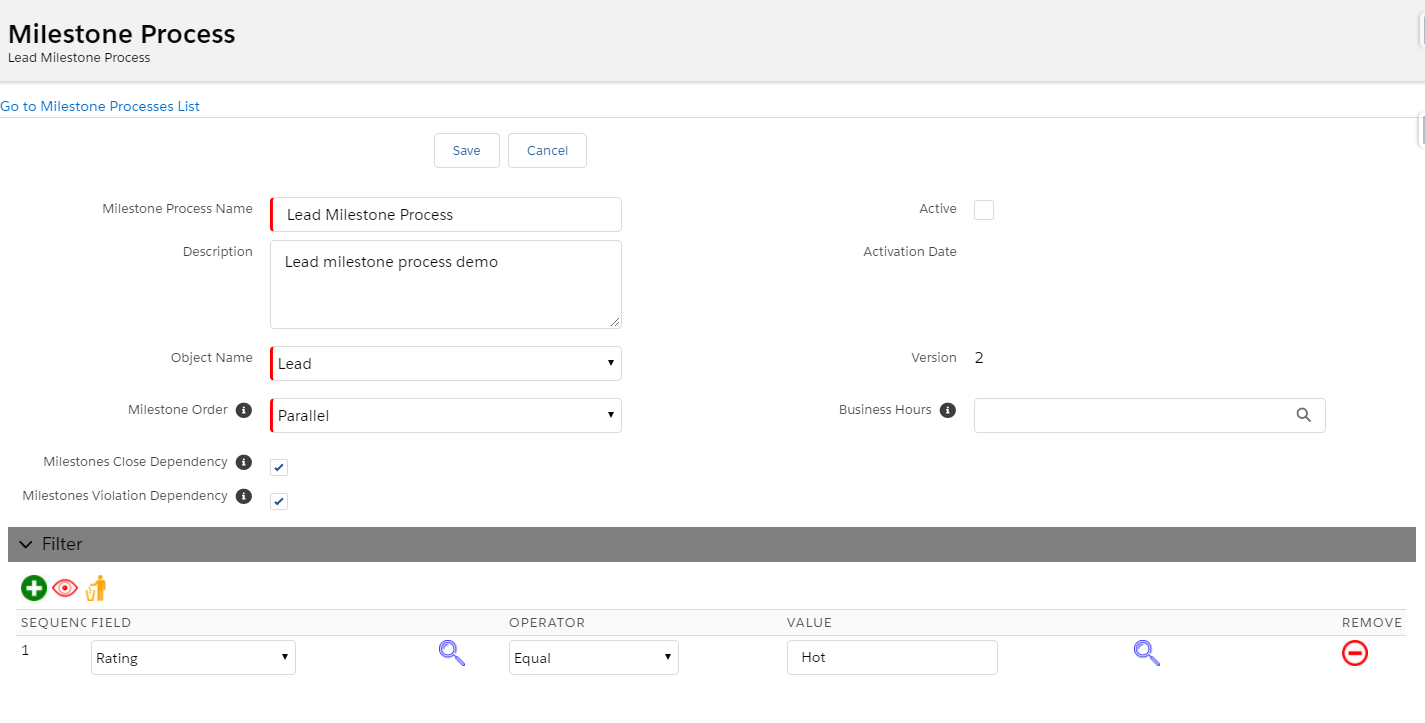


In the image you can see additional input, which support additional functionality:
  • Version - allow to manage version for each milestone process
  • Milestone Order - relation between milestones. For example, what should happened if the second milestone completed before the first.
  • Business Hours - reference to business hour setup. This will make the process count the milestone/action timeline only within the business hours.

Next, setup the Milestones
Each milestone should have name, sequence, target time for completion and target criteria.
The target time define when the milestone should be completed, and the target criteria define the criteria. For the criteria, again I used the same component which I used to define criteria in the milestone process, it can be simplified by using string value. It can save efforts but make the tool less user oriented.


After adding 2 milestones the milestone process look like this


Next, under each milestone we might want to setup actions to run. Each action can run either before/after violation or it can run when the milestone complete.
Therefore each Action have Type either Violation or Completion and Action.
In my case I implemented 4 action type:
Email Alert
Update Record
Lock Record
Unlock Record

The Lock/Unlock are special implementation therefore can ignore them in this article. In the alert you should get setup for the subject, email content, notify. For Update Record action, you will need to save pair of field-value for the related object that will be used to update.


After completing the setup Milestone Process, Milestone, Milestone Action, you should go and activate the main Milestone Process. 


3.Transaction process.
You should implement several processes with apex. Some of them can be done in trigger and other should be done with apex scheduler.
Should have at least trigger on every object that you want to setup milestone process.
In this trigger you will to do 3 things:
  • When record created - check it apply to any related milestone process. If it does, generate the milestones records and the milestone actions according to the setup.
  • When record updated - check if any of the related milestone was completed according to the milestone target criteria, if it does close it and run any related actions of type Completion.
  • When record deleted - simply delete its related milestone/action records (if exists).

Note that during the update trigger you will need to evaluated the the Milestone Target against the records. First check if any relevant field was changed and if so check if the record apply to the criteria. 
Obviously, it will be inefficiency to query the milestone setup and run this evaluation on every change, therefore you might want to store the relevant fields from the target criteria in setup (e.g. custom metadata). In the trigger you will first check if any of the fields from the setup was change, and only if it does run the complex logic.

4.Apex Scheduler
This process will run on specific interval and will check 2 things:
  • If any milestone date was violated (due date > now), then it should update their status to Violated and cancel the relevant actions.
  • If any action of type Violation date is arrived then it should run this action
You might also want to add screen for scheduling/aborting the job or view its logs, but it is not mandatory.

5.Record layout component
Probably want to view in each record, its related milestones.
In Salesforce classic you might had technical problems to implement such, because you must related visualforce page to specific object in order to have it in the page layout, but in Salesforce Lightning you can easily write component (Aura or LWC) that can be used in any layout.


Also note that in my case I added button in the component Recreate Milestones. This will recreate the milestone/action for the related record. It can be used for exceptional cases where you need to run the process on old records. Anyway, if needed suggest to show this button only with special permission, as the process cannot revert.


Finally - quick demo that shows my implementation


Dynamic Visualforce Page with Standard Controller Pagination


Find myself writing similar page in several requirements - page that display records from specific objects, support pagination, filtering, sorting.


Thought that it's about time to take 1 of the pages I had and make it generic. To be rendered based on configuration.


How to do it?

1.Create new custom metadata for the configuration.


2.Create apex class

  1
  2
  3
  4
  5
  6
  7
  8
  9
 10
 11
 12
 13
 14
 15
 16
 17
 18
 19
 20
 21
 22
 23
 24
 25
 26
 27
 28
 29
 30
 31
 32
 33
 34
 35
 36
 37
 38
 39
 40
 41
 42
 43
 44
 45
 46
 47
 48
 49
 50
 51
 52
 53
 54
 55
 56
 57
 58
 59
 60
 61
 62
 63
 64
 65
 66
 67
 68
 69
 70
 71
 72
 73
 74
 75
 76
 77
 78
 79
 80
 81
 82
 83
 84
 85
 86
 87
 88
 89
 90
 91
 92
 93
 94
 95
 96
 97
 98
 99
100
101
102
103
104
105
106
107
108
109
110
111
112
113
114
115
116
117
118
119
120
121
122
123
124
125
126
127
128
129
130
131
132
133
134
135
136
137
138
139
140
141
142
143
144
145
146
147
148
149
150
151
152
153
154
155
156
157
158
159
160
161
162
163
164
165
166
167
168
169
170
171
172
173
174
175
176
177
178
179
180
181
182
183
184
185
186
187
188
189
190
191
192
193
194
195
196
197
198
199
200
201
202
203
204
205
206
207
208
209
210
211
212
213
214
215
216
217
218
219
220
221
222
223
224
225
226
227
228
229
230
231
232
233
234
235
236
237
238
239
240
241
public with sharing class SearchObjectController {

    public Search_Object_Setup__mdt searchPageSetup {get; set;}
    
    public list<FieldToShow> l_fields {get; set;}
    public list<FilterInPage> l_filters {get; set;}
    
    public String filterParamIds {get; set;}
    
    private String soql;
    private String soqlCtr {get;set;}
    
    public Integer ctrRecords {get;set;}
    Public Integer noOfRecords{get; set;}   // Number of total records in Query

    // the collection of contacts to display
    private list<sObject> l_records;

    private Integer pageSize;  
    private Integer totalRecords = 3000;
    
    public String pageTitle {get; set;}
    
    //set controller
    private ApexPages.StandardSetController setCon;     // standart set controller supporting pagination. CANNOT be Transietnt (results in Error)

    public  list<sObject> getl_records(){
        return this.setCon.getRecords();
    }
    
    public String sortDir { get; set; }
    public String sortField { get; set; }
    
    // toggles the sorting of query from asc<-->desc
    public void toggleSort() {
        // simply toggle the direction
        sortDir = sortDir.equals('asc NULLS FIRST ') ? 'desc NULLS LAST ' : 'asc NULLS FIRST ';
    
        runQuery();
    }
    
    // init the controller and display some initial data when the page loads
    public SearchObjectController () {

        //String searchObjectPageId = Apexpages.currentPage().getParameters().get('pId');
        String searchObjectName = Apexpages.currentPage().getParameters().get('pn');
        
        searchPageSetup = [ select DeveloperName,Page_Size__c,Page_Title__c,Fields_to_Display__c,Filters__c,Object_API_Name__c
                            from Search_Object_Setup__mdt
                            where DeveloperName = :searchObjectName];
        
        pageSize = searchPageSetup.Page_Size__c != null ? Integer.valueOf(searchPageSetup.Page_Size__c) : 20;
        pageTitle = searchPageSetup.Page_Title__c;
        l_fields = new list<FieldToShow>();
        l_filters = new list<FilterInPage>();
        
        //Get object schema
        Schema.SObjectType objSchema = Schema.getGlobalDescribe().get(searchPageSetup.Object_API_Name__c);
        
        filterParamIds = '';
        
        if(! String.isBlank(searchPageSetup.Filters__c)){
        
            Integer filterIndex = 1;
        
            for(String fieldFilter : searchPageSetup.Filters__c.split(',')){
                l_filters.add(new FilterInPage(fieldFilter, ('prmid_' + String.valueOf(filterIndex)), objSchema.getDescribe().fields.getMap().get(fieldFilter).getDescribe().getLabel()));
            
                filterParamIds += ('prmid_' + String.valueOf(filterIndex)) + ',';
                
                filterIndex++;
            }
        
            filterParamIds = filterParamIds.removeEnd(',');
        
        }
        
        soql = 'select ';
        for(String fieldAPI : searchPageSetup.Fields_to_Display__c.split(',')){
            soql += fieldAPI + ',';
            
            l_fields.add(new FieldToShow(fieldAPI, objSchema.getDescribe().fields.getMap().get(fieldAPI).getDescribe().getLabel()));
        }
        soql = soql.removeEnd(',');
        
        soql += ' from ' + searchPageSetup.Object_API_Name__c;
        
        soqlCtr = 'SELECT Count() from ' + searchPageSetup.Object_API_Name__c;
        
        sortField = 'Name';
        sortDir = 'desc NULLS LAST';
        
        runQuery();
    }
    
    //Runs the actual query, with parameters as set by the User
    public void runQuery() {

        try {
            System.debug(soql + ' order by ' + String.escapeSingleQuotes(sortField) + ' ' + String.escapeSingleQuotes(sortDir) + ' limit ' + totalRecords);
            l_records  = Database.query(soql + ' order by ' + String.escapeSingleQuotes(sortField) + ' ' + String.escapeSingleQuotes(sortDir) + ' limit ' + totalRecords);
            
            this.setCon= new ApexPages.StandardSetController(l_records);
            this.setCon.setpageNumber(1); // First page to display
            this.setCon.setPageSize(pageSize); // First chuck of 20 records to display
            noOfRecords = this.setCon.getResultSize(); // # records in the resulst set,, driven by limit and ViewState size

            ctrRecords = Database.countQuery(soqlCtr ); // Total number of records for the Query (no Limit used)
        } catch (Exception ex) {
            ApexPages.addMessage(new ApexPages.Message(ApexPages.Severity.ERROR, 'Error during query: ' + ex.getMessage()));
        }
    }

    //Run the search with parameters passed via Javascript.
    //Invoked when user chnages seach criteria or page size on the page
    public PageReference runSearch() {
    
        System.debug('Run Search with params');
        
        soql = 'select ';
        for(FieldToShow  fieldPage : l_fields){
            soql += fieldPage.field + ',';
        }
        soql = soql.removeEnd(',');
        
        soql += ' from ' + searchPageSetup.Object_API_Name__c;
        
        String whereClause = ' where';
        
        String inputFilters = ApexPages.currentPage().getParameters().get('allInputParams');
        
        System.debug('inputFilters : ' + inputFilters );
        
        list<String> l_inputFilters = inputFilters.split(',');
        
        System.debug('l_inputFilters : ' + l_inputFilters );
        
        Integer index = 0;
        
        for(index = 0; index < l_filters.size() ; index ++) {
            
            if(l_inputFilters.size() > index){
                l_inputFilters.get(index);
        
                if(! String.isBlank(l_inputFilters.get(index))){
                    whereClause += (whereClause == ' where' ? ' ' : ' and') + ' ' + l_filters.get(index).field + ' LIKE \'%' + String.escapeSingleQuotes(l_inputFilters.get(index)) + '%\'';
                }
            }
        }
        
        if(whereClause != ' where'){
            soql += whereClause;
        }
           
        runQuery();

        return null;
    }
  
    //Advance to next page
    public void doNext(){
        if(this.setCon.getHasNext())
            this.setCon.next();
    }
    
    //Advance to previous page
    public void doPrevious(){
        if(this.setCon.getHasPrevious())
            this.setCon.previous();
    }
    //Get whether previous page exists
    public Boolean getHasPrevious(){
        return this.setCon.getHasPrevious();
    }
    
    
    //Get whether next page exists
    public Boolean getHasNext(){
        return this.setCon.getHasNext();

    }
    
    
    //Get page number
    public Integer getPageNumber(){
        return this.setCon.getPageNumber();
    }
    
    
    //Get total pages in the current Query
    Public Integer getTotalPages(){
    
        Decimal totalSize = this.setCon.getResultSize();
        Decimal pageSize = this.setCon.getPageSize();
        
        Decimal pages = totalSize/pageSize;
        
        return (Integer)pages.round(System.RoundingMode.CEILING);
    }
    
    //First page of pagination
    public void doFirst() {
        setCon.first();
    }
  
    //Last page of pagination
    public void doLast() {
        setCon.last();
    }

    public Integer getpageSize() {
        return pageSize;
    }
      
    //Invoked when the user change page size on page, viajs  doSeacrh() calling  runSearch()  
    public void setpageSize(Integer pageSize) {
        this.pageSize = integer.valueof(pageSize);
    }
    
    public class FieldToShow {
        public String field {get; set;}
        public String label {get; set;}
        
        public FieldToShow (String f, String l){
            field = f;
            label = l;
        }
    }
    
    public class FilterInPage{
        public String field {get; set;}
        public String paramId {get; set;}
        public String label {get; set;}
        
        public FilterInPage (String f, String p, String l){
            field = f;
            paramId = p;
            label = l;
        }
    }
}


3.Create Visualforce page

  1
  2
  3
  4
  5
  6
  7
  8
  9
 10
 11
 12
 13
 14
 15
 16
 17
 18
 19
 20
 21
 22
 23
 24
 25
 26
 27
 28
 29
 30
 31
 32
 33
 34
 35
 36
 37
 38
 39
 40
 41
 42
 43
 44
 45
 46
 47
 48
 49
 50
 51
 52
 53
 54
 55
 56
 57
 58
 59
 60
 61
 62
 63
 64
 65
 66
 67
 68
 69
 70
 71
 72
 73
 74
 75
 76
 77
 78
 79
 80
 81
 82
 83
 84
 85
 86
 87
 88
 89
 90
 91
 92
 93
 94
 95
 96
 97
 98
 99
100
101
102
103
104
105
106
107
108
109
110
111
112
113
114
115
116
117
118
119
120
121
122
123
124
125
126
127
128
129
130
131
132
<apex:page controller="SearchObjectController" sidebar="false">

<script type="text/javascript">


    var delayTimer;

    function doSearch() {
        // Invoked every time a key is pressed
        //### filter for real chars
        clearTimeout(delayTimer);   // clear timeout if less than 1000 msec passed, so we do not call for every key pressed
        
        var paramsIds = '{!filterParamIds}';
        var paramsList = paramsIds.split(',');
        
        var params = '';


        for(var i=0; i < paramsList.length; i++ ) {
            params += document.getElementById(paramsList[i]).value + ',';
        }
        
        //params = params.substring(0, params.length - 1);
        
        console.log('###' + params);
        
        delayTimer = setTimeout(function() {
            // if 1 sec passed with no keys pressed, invoke the backend  search
            // Do the ajax stuff 
            searchServer(params);
        }, 1000); // Will do the ajax stuff after 1000 ms, or 1 s


      }  //doSearch()
</script> 
<apex:form Id="theForm">
    <apex:pageMessages id="errors" />

    <apex:pageBlock title="{!pageTitle}" mode="edit">

        <table width="100%" border="0">
            <tr>  
                <td width="200" valign="top">

                    <apex:pageBlock title="Parameters" mode="edit" id="criteria">
                    
                        <table cellpadding="2" cellspacing="2">
                        
                            <apex:repeat value="{!l_filters}" var="filterInPage">
                                <tr>
                                    <td style="font-weight:bold;">{!filterInPage.label}<br/>
                                        <input type="text" id="{!filterInPage.paramId}" onkeyup="doSearch();"/>
                                    </td>
                                </tr>
                            </apex:repeat>
                                                        
                        </table>

                        <apex:actionStatus id="queryIndicator" >
                            <apex:facet name="start">             
                                <apex:image url="{!$Resource.LoadingProgress}" />                          
                            </apex:facet>   
                            <apex:facet name="stop" >
                            </apex:facet>
                        </apex:actionStatus>


                    </apex:pageBlock>

                    <apex:pageBlock id="ctr">
                        Total records for Query: <apex:outputText value="{!ctrRecords}" />     
                    </apex:pageBlock>
                </td>
                <td valign="top">

                    <apex:pageBlock mode="edit" id="results">

                        <apex:pageBlockTable value="{!l_records}" var="rec">
                        
                            <apex:repeat value="{!l_fields}" var="fToShow">
                                <apex:column > 
                                    <apex:facet name="header">
                                        <apex:commandLink value="{!fToShow.label}" action="{!toggleSort}" rerender="results,debug, ctr"  status="queryIndicator">
                                            <apex:param name="sortField" value="{!fToShow.field}" assignTo="{!sortField}"/>
                                        </apex:commandLink>
                                    </apex:facet>
                                    <apex:outputField value="{!rec[fToShow.field]}"/>
                                </apex:column>
                            </apex:repeat>
                            
                        </apex:pageBlockTable>

                        <apex:panelGrid columns="10">
                            <apex:commandButton status="fetchStatus" reRender="results" value="|<" action="{!doFirst}" disabled="{!!hasPrevious}" title="First Page" />
                            <apex:commandButton status="fetchStatus" reRender="results" value="<" action="{!doPrevious}" disabled="{!!hasPrevious}" title="Previous Page" />
                            <apex:commandButton status="fetchStatus" reRender="results" value=">" action="{!doNext}" disabled="{!!hasNext}" title="Next Page" />
                            <apex:commandButton status="fetchStatus" reRender="results" value=">|" action="{!doLast}" disabled="{!!hasNext}" title="Last Page" />
                            <apex:outputLabel value=" [page {!pageNumber} of {!totalPages}] " />
                            <apex:outputText >
                               [Items  {!(pageNumber * pageSize)+1-pageSize}-{!IF((pageNumber * pageSize)>noOfRecords, noOfRecords,(pageNumber * pageSize))} of {!noOfRecords} Records]
                            </apex:outputText>
                            &nbsp;&nbsp;&nbsp;&nbsp;&nbsp; Select Records per Page: 
                            <apex:selectList value="{!pageSize}" multiselect="false" size="1" onchange="doSearch();">
                                <apex:selectOption itemValue="10" itemLabel="10"/>
                                <apex:selectOption itemValue="20" itemLabel="20"/>
                                <apex:selectOption itemValue="50" itemLabel="50"/>
                                <apex:selectOption itemValue="500" itemLabel="500"/>
                                <apex:selectOption itemValue="1000" itemLabel="1000"/>
                            </apex:selectList><p/>

                            <apex:outputPanel style="color:#4AA02C;font-weight:bold">
                                <apex:actionStatus id="fetchStatus" startText="Fetching..." stopText=""/>
                            </apex:outputPanel>
                        </apex:panelGrid>

                    </apex:pageBlock>

                </td>
            </tr>
        </table>

    </apex:pageBlock>
    
    <apex:actionFunction name="searchServer" action="{!runSearch}" rerender="results,debug,errors,ctr" status="queryIndicator">
        <apex:param name="allInputParams" value="" />
    </apex:actionFunction>

</apex:form>

</apex:page>


4.The above steps were for the infra components.
Now we can reuse it by create custom metadata record.
For example:


-Redirect to the page URL
/apex/SearchObject?pn=Search_Account


View Any Record Page

Common case is when admin/developer need to view additional data in production.
Some common approaches:
-Add the data in the page layout.
-Use developer console query.
-Create list view.
I think the first method is the most common. If the admin uses the same page layouts as regular users then this might expose to users data that they should see, if they have different page layouts then there is no issue for adding the data only this require maintain more page layouts.
The latest 2 approaches- writing a query in console or creating the list view-  also can be used, but are more time consuming.

At last, I decided to use different simple and generic solution. It does require me to write code, but it is done once and then I can reused it.
The functionality is quite simple - user will select the object type, will search single record either by Id or by Name, and will be able to view/update any field.
Of course, that the access for this page should be highly restricted as it provide access to all the data.


Controller:

  1
  2
  3
  4
  5
  6
  7
  8
  9
 10
 11
 12
 13
 14
 15
 16
 17
 18
 19
 20
 21
 22
 23
 24
 25
 26
 27
 28
 29
 30
 31
 32
 33
 34
 35
 36
 37
 38
 39
 40
 41
 42
 43
 44
 45
 46
 47
 48
 49
 50
 51
 52
 53
 54
 55
 56
 57
 58
 59
 60
 61
 62
 63
 64
 65
 66
 67
 68
 69
 70
 71
 72
 73
 74
 75
 76
 77
 78
 79
 80
 81
 82
 83
 84
 85
 86
 87
 88
 89
 90
 91
 92
 93
 94
 95
 96
 97
 98
 99
100
101
102
103
104
105
106
107
108
109
110
111
112
113
114
115
116
117
118
119
120
121
122
123
124
125
126
127
128
129
130
131
132
133
134
135
136
137
138
139
140
141
142
143
144
145
146
147
148
149
150
public class ViewRecord{

    public String objectType {get; set;}
    public String recordName {get; set;}
    public String recordId {get; set;}
    public map <String, Schema.SObjectType> schemaMap ;
    
    public list<String> l_objects {get ;set;}
    public list<String> l_fields {get; set;}
    public list<String> l_values {get; set;}
    public sObject record {get;set;}
    
    public SelectOption[] selectedFields { get; set; }
    public SelectOption[] allFields { get; set; }
    
    public list<SelectOption> objectoptions{
    get{
        list<SelectOption> pOptions = new list<SelectOption>(); 
        
        pOptions.add(new SelectOption('none', 'Select Object'));
        
        for(String obj: l_objects){
            
            pOptions.add(new SelectOption(obj,obj));
        }
        
        return pOptions;
    }
    set;
    }
    
    public ViewRecord(){
        schemaMap = Schema.getGlobalDescribe();
        l_objects = new list<string>();
        
        selectedFields = new list<SelectOption>();
        allFields = new list<SelectOption>();
        
        for(Schema.SObjectType schemaType : schemaMap.values()){
            
            Schema.DescribeSObjectResult ds = schemaType.getDescribe();
            
            if(ds.isCreateable())
                l_objects.add(ds.getName());
        }
        
        l_objects.sort();
    }
    
    public PageReference fillOptions(){
        selectedFields.clear();
        allFields.clear();
        
        if(objectType != 'none'){
            for(Schema.SObjectField field : schemaMap.get(objectType).getDescribe().fields.getMap().values()){
                Schema.DescribeFieldResult dr  = field.getDescribe();
            
                if(dr.isUpdateable()){
                    allFields.add(new SelectOption(dr.getName(), dr.getName()));
                }
            }
        }
        
        return  Apexpages.currentPage();
    }
    
    public PageReference showRecord(){
    
    try{
    
        if(objectType != 'none'){
            l_fields = new list<String>();
            l_values = new list<String>();
        
            String sql = 'select ';
            
            if(selectedFields.isEmpty()){
                for(Schema.SObjectField field : schemaMap.get(objectType).getDescribe().fields.getMap().values()){
                    Schema.DescribeFieldResult dr  = field.getDescribe();
                
                    if(dr.isUpdateable()){
                        sql += dr.getName() + ',';
                   
                        l_fields.add(dr.getName());
                    }
                }
            }
            else{
                for(SelectOption option : selectedFields){
                    sql += option.getValue() + ',';
                
                    l_fields.add(option.getValue());
                }
            }
            
            l_fields.sort();
            
            sql = sql.subString(0, sql.length()-1) + ' from ' +objectType;
            
            if(!String.isEmpty(recordId))
                sql += ' where id = \'' + recordId + '\'';
            else if(!String.isEmpty(recordName))
                sql += ' where name = \'' + recordName + '\'';
            else{
                ApexPages.addMessage(new ApexPages.Message(ApexPages.Severity.ERROR, 'Add Filter!'));
                return null;
            }
            
            
            system.debug('####'+ sql);
        
            list<sObject> l_obj = database.query(sql);
        
            if(l_obj.size() > 0){
                //for(String field: l_fields){
                 //   l_values.add((String)l_obj.get(0).get(field));
               // }
                
                record = l_obj.get(0);
            
            }
        }
        
     }catch(Exception ex){
         ApexPages.addMessage(new ApexPages.Message(ApexPages.Severity.ERROR, 'Bad thing happen...' + ex.getMessage() + ' : ' + ex.getStackTraceString()));
            return null;
     }
    
        return null;
    }


    public PageReference updateRecord(){
        try{
            if(record!=null)
                update record;
                
     ApexPages.addMessage(new ApexPages.Message(ApexPages.Severity.INFO, 'Done'));
        }
        catch(Exception ex){
            ApexPages.addMessage(new ApexPages.Message(ApexPages.Severity.ERROR, 'Bad thing happen...' + ex.getMessage() + ' : ' + ex.getStackTraceString()));
            return null;
        }
        return null;
    }


}


Page
1:  <apex:page controller="ViewRecord">  
2:  <apex:form id="formId">  
3:    <apex:pageMessages />   
4:    <apex:pageblock id="blockId">  
5:     <apex:pageblockSection id="pbSection">  
6:       <apex:pageblockSectionItem id="pbsi">  
7:         <apex:outputLabel value="Select Object" for="objectTypeId" />  
8:         <apex:selectList multiselect="false" id="objectTypeId" value="{!objectType}" size="1">  
9:           <apex:selectoptions value="{!objectoptions}" />  
10:           <apex:actionSupport event="onchange" reRender="formId,blockId,pbSection,pbsi,fieldsId"/>  
11:           <apex:actionSupport event="onchange" action="{!fillOptions}"/>  
12:         </apex:selectList>  
13:       </apex:pageblockSectionItem>  
14:        <apex:pageblockSectionItem />  
15:       <apex:pageblockSectionItem >  
16:         <apex:outputLabel value="Search by Id" />  
17:         <apex:inputText value="{!recordId}"/>  
18:       </apex:pageblockSectionItem>  
19:       <apex:pageblockSectionItem />  
20:       <apex:pageblockSectionItem >  
21:         <apex:outputLabel value="Search by name" />  
22:         <apex:inputText value="{!recordName}"/>  
23:       </apex:pageblockSectionItem>  
24:     </apex:pageblockSection>  
25:     <apex:pageBlockButtons location="top">    
26:       <apex:commandButton value="Show Record" action="{!showRecord}"/>  
27:     </apex:pageBlockButtons>  
28:   </apex:pageblock>  
29:   <apex:pageBlock rendered="{!Not ISBlank(record)}">  
30:     <apex:pageBlockButtons location="top">    
31:       <apex:commandButton value="Update" action="{!updateRecord}" rendered="{!Not ISBlank(record)}"/>  
32:     </apex:pageBlockButtons>  
33:     <apex:pageblockSection >  
34:       <apex:repeat value="{!l_fields}" var="field">  
35:          <apex:pageblockSectionItem >  
36:             <apex:outputLabel value="{!field}" />  
37:             <apex:inputField value="{!record[field]}"/>  
38:          </apex:pageblockSectionItem>  
39:          <apex:pageblockSectionItem />  
40:       </apex:repeat>  
41:     </apex:pageblockSection>  
42:   </apex:pageBlock>  
43:  </apex:form>  
44:  </apex:page>  


Retire of Permission on Profiles

If you are working as a Salesforce admin/developer you've probably heard somewhere that Salesforce is planning to make a significant cha...